Timekiwi is an interesting new web app created by Codeartists which lets you create a timeline using your social media accounts. The site offers a new take on lifestreaming, by bringing the timeline format into the final product.
At the moment the only services that are supported are Twitter, Tumblr, Posterous, WordPress.com and Instagram.
After you’ve selected which accounts you want included in your timeline, simply click ‘Show me my timeline’ and Timekiwi will do the rest.
When it comes to Twitter, old school retweets will show up in your timeline, but Twitter’s native retweet function as well as any replies you make to other tweeps won’t show up in your timeline.
Because Timekiwi doesn’t require authentication, you could theoretically create a timeline using any account of your choice, but are limited to one account per service.
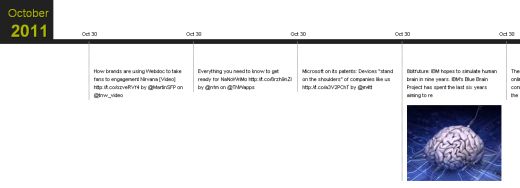
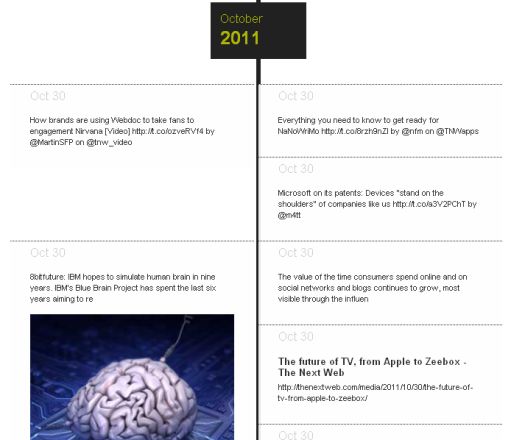
There are two layouts available for your timeline. You can either view your timeline horizontally:
 or vertically:
You can then share the link with your friends or share directly through the site to Facebook, Twitter, via email, or through various other social networks. You can also print your timeline if you want.

Each time the bit.ly URL of your timeline is refreshed, it should include any new posts that have been added since the timeline was created.
Timekiwi really comes to life if you’re particularly active on Tumblr, Posterous or share a lot of images on Twitter. It becomes a great way to show off interesting images you’ve shared, in chronological order. It also becomes a great way for photographers to display their Project 365 images.
There’s no limit to how creative you can get with your use of Timekiwi. If you want to create a timeline of historical events, there’s no reason you can’t do that using the service. WordPress.com gives you the option of choosing the exact date of your posts before publishing, so you can create a historical timeline, of World War II for example, using WordPress, and then importing it into Timekiwi.
In our experience, if you add any pre-dated posts after the timeline has been generated, they don’t show up, so it might be best to make sure you have your entire timeline ready to display before you add your WordPress.com account to Timekiwi. There didn’t appear to be any limit to how far back in time you can go with the WordPress posts.
If you’re going to add Instagram to your timeline, be sure to connect it last, otherwise you’ll have to start the process all over again.
Aside from personal use, brands can also use Timekiwi and benefit from a few extra features, but that service is currently in private beta and requires that you contact them first.
Have you created a timeline using Timekiwi? Share it with us in the comments.
Get the TNW newsletter
Get the most important tech news in your inbox each week.


