
As we reported, Twitter announced today that it may block specific content on a country-by-country basis if required. However, it seems very easy to get around these upcoming limitations.
Indeed, Twitter’s Help Center itself gives a good clue on how to bypass them very easily. Here’s a step-by-step explanation:
Identify withheld content
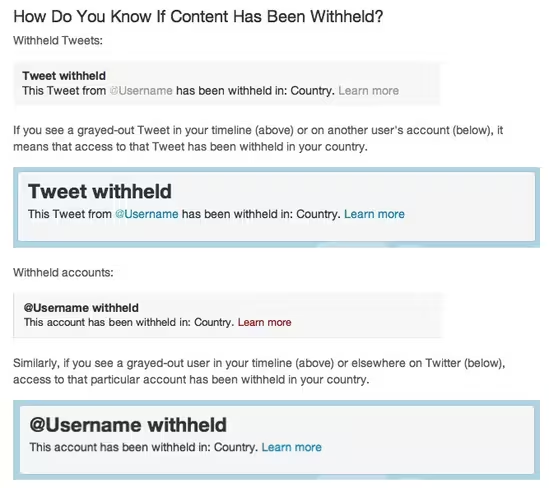
The first thing to do is to identify that some content has been blocked in your country. You won’t need to monitor Chilling Effects to know a tweet or a user have been blocked if you stumble upon them. Instead, you’ll see the following warnings:
Change your country settings to ‘Worldwide’
Twitter then goes on to explain how to tell the platform that it has misidentified your country, which it automatically guesses based on your IP. You can find this parameter in your account settings:
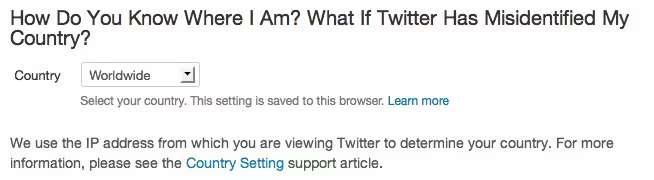
What Twitter refrains from saying, and that many may have guessed, is that nothing prevents you to do the same even if Twitter didn’t get your country wrong. In other words, all you have to do if you want to see a ‘blocked’ tweet is to change your Country setting after reading the warning.
Since Twitter made clear that restrictions will likely be limited to one or several countries, the best way to prevent this problem from ever happening is to set this setting to ‘Worldwide’ another country right now.
Update: It seems that Twitter automatically reverts to your IP country if you try to set it to “Worldwide” but changing to another country worked fine for us.
Why it is clever
Chances are that Twitter perfectly knows about this workaround, and its details are particularly well thought. Knowing that content has been blocked is a very good start, but that’s not the best thing about it.
What’s particularly clever is its ease of use, even in countries where technical workarounds may be difficult to access. Users won’t need to hide their IP with a proxy: Twitter lets them change it manually, despite the potential loss in hyperlocal ad dollars for the platform.
Well done, Twitter, chances are tweets will continue to flow for quite a while.
Thanks @tapbot_paul for the tip.


[...] about Twitters new restrictions?! Check out this link and find out [...]
[...] The Next Web har med hjelp av Twitters brukermanual laget en oppskrift på hvordan du kan gå rundt eventuelle [...]
[...] so Twitter has announced that it will censor Tweets in countries where it is requested to do so. On the one hand it sounds a fairly half-hearted [...]
[...] picks up your country via IP identification), so you’ll still be able to get at that content (thanks TNW). Only problem there is that Twitter is accessed more and more via mobile – when I’m [...]
[...] Bron: TheNextWeb ©Twittermania @Hermaniak [...]
[...] formas de que los usuarios locales accedan a esos contenidos censurados, tal y como explican en The Next Web, donde revelan cómo descubrir qué se ha censurado y como poder verlo. Suponemos que Twitter [...]
[...] the meantime, it turns out that circumventing this ‘censorship’ is currently trivially easy: simply change your country setting to a more liberal [...]
[...] after the announcement, The Next Web reported that it was easy to work around the censorship – Twitter puts you in a country based on your IP [...]
[...] after the announcement, The Next Web reported that it was easy to work around the censorship – Twitter puts you in a country based on your IP [...]
[...] after the announcement, The Next Web reported that it was easy to work around the censorship – Twitter puts you in a country based on your IP [...]
[...] The Next Web is reporting that changing the country in your account settings to a “free” country like the U.S. or U.K. will bypass the censorship tool. Users were able to select worldwide to bypass the the censoring, but it reverts back to your IP selected country when chosen now. [...]
[...] workaround that promises to unmask redacted content. In fact, Twitter itself prompted the idea; TNW spotted that by changing the manual country selection setting to a different location, in [...]
[...] workaround that promises to unmask redacted content. In fact, Twitter itself prompted the idea; TNW spotted that by changing the manual country selection setting to a different location, in [...]
[...] in one day, it provided users with the news that content could be censored by location, while also giving them a simple method, one-click away, to make sure that the tweets do flow, regardless of [...]
[...] after a announcement, The Next Web reported that it was easy to work around a censorship – Twitter puts we in a nation formed on your IP [...]
[...] 6: Der Clever-Reflex Blogger beginnen damit, Workarounds zu ermitteln und kräftig auf diese Alternativen hinzuweisen. Auf Nebenschauplätzen der [...]
[...] EDIT: How To Get Around Twitter Restrictions. [...]
[...] Foundation and several law schools, to maintain a database of the take-down requests it receives.The technology blog The Next Web also argues that Twitter has made it very easy to read a post that might be blocked in some [...]
[...] The technology blog The Next Web also argues that Twitter has made it very easy to read a post that might be blocked in some countries. And because the new policy involves publishing information about where the posting was blocked, users will now have more information about removal requests than they had before. [...]
[...] Via The Next Web [...]