
Twitter started testing a new way of delivering tweets to users this week. As the videos we posted showed, they’re going to change your Twitter experience forever.
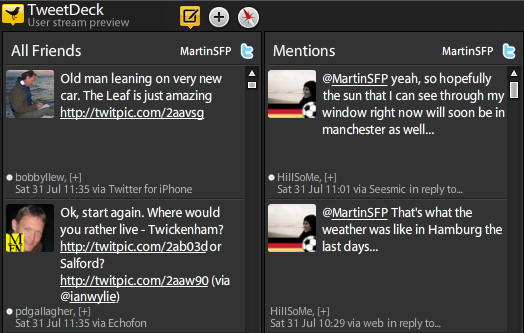
Some of the changes that User Streams usher in immediately improve Twitter while others will take some getting used to. Having been using the User Stream Preview version of Tweetdeck for a couple of days now, here we bring you an overview of how Twitter will be changing for everyone in coming months.
Improvements
Real-time tweets: The first thing you’ll notice about User Streams is that you get tweets pushed to you as users posts them. There’s no need to click ‘Refresh’ or wait for for your Twitter client to go pull them in every couple of minutes. With User Streams you see Twitter ‘as it happens’. As more people sart using it, we imagine Twitter will become even more of a ‘chat room’ than it already is. Whereas in the past you had to wait a minute or two for replies to come though, it now possible to have a conversation spanning several tweets in the space of a minute.
See who ‘Favorites’ your tweets: Until now there’s been no easy way to see which of your tweets are being marked as Favorites by other users. Users’ Favorites have always been public (even if some users appear not to have been aware of that fact), now for the first time your Twitter client can tell you instantly when someone clicks the ‘Favorite’ button on one of your missives. As we discussed earlier this week, this could see the ‘Favorite’ becoming Twitter’s equivalent of Facebook’s ‘Like’ button.

All @ replies: An early feature of Twitter was the ability to see every tweet the people you followed sent, even one sent to people you don’t follow. Many users found this a good way of finding new people to follow but as user numbers grew, Twitter had to remove the feature to reduce strain on its servers. User Streams brings the option back for those who want it, although Twitter has been looking at other ways of discovering new people to follow in recent months, including newly announced recommendations.
 New follower notifications: Forget waiting for an email to see your latest followers, User Streams can push that information directly to your Twitter app, meaning that there’s no need to make regular trips to the Twitter web interface to see whether it’s worth following them back. Very handy.
Faster search: Simple searches are now real-time. Search for a popular word or phrase and you’ll get a constant rain of tweets back. More complex searches, “eat+sleep -food -chocolate”, for example still rely on the old method of search however so there will still be a delay there.
What needs work
Speed control: While receiving tweets in real-time makes Twitter a smoother, faster experience; it does take some getting used to. User Streams-enabled Twitter is probably unusable right now if you follow a few thousand people – it will be an unmanageable ‘power shower’ of tweets moving so fast that you’ll struggle to read them. It’s just about manageable when following up to about 1500 people, but you may need to keep your eye on your Twitter app more closely than you’re currently used to.

Twitter app developers will need to think of a way of controlling the continual cascade of tweets. A ‘Pause’ button would be a good start and maybe a slider control for setting the maximum speed of tweets.
Lists: If you do follow a lot of people you may well rely on Twitter Lists to keep track of people that you’re interested in. Sadly, right now Lists aren’t supported by User Streams. This means that although your ‘All Friends’, ‘Replies’ and ‘Direct Messages’ feeds will all be lightning fast; more specialised lists that you’ve created will seem really slow by comparison. In April when it announced User Streams, Twitter said support for Lists may “perhaps” be introduced in the future.
What do you think of User Streams?
If you’ve been testing User Streams this week we’d love to hear what your thoughts are. We’d conclude that right now Users Streams make Twitter faster, easier to use and even a little more fun.
If you want to try User Streams you can purchase the premium version of Echofon for Mac or apply to take part in the free User Stream Preview of Tweetdeck. The new technology will be gradually rolled out to further Twitter clients over time.
Get the TNW newsletter
Get the most important tech news in your inbox each week.
Also tagged with


