
Fibre
When you installed iOS4 on your aging iPhone 3G, you might have expected a minor performance boost, features that complimented the handset and a bit of life returning back into your device. In reality, the iOS4 update has rendered many iPhone 3G units unusable with apps crashing, system lags and general unresponsiveness.
Apple has officially announced it is looking into the issues and we have already seen that the upcoming iOS 4.1 update will ultimately put an end to most of the speed issues currently affecting the iPhone 3G. If you can’t wait until then, here are five measures you can take to speed up your iPhone 3G and make the wait for iOS 4.1 bearable.
1. Disable Spotlight Search Options
 Spotlight Search is the screen on your iPhone that you have no doubt navigated to by mistake. Here, you can search for messages, contacts, apps etc residing on your phone. By turning off the categories that your iPhone 3G will search, you should see some speed improvements:
To disable the options within Spotlight Search, do the following:
Navigate to Settings –> General -> Home Button -> Spotlight Search and uncheck all of the options listed.
Once you have disabled these options, you will be unable to search for specific items on your iPhone. You will, however, still be able to search Wikipedia and the web.
2. Perform A Hard Reset (Twice)
We have seen many reports from users suggesting that if a hard reset is performed on the iPhone 3G, the device will perform faster as a result. Results vary from person to person but performing two hard resets on your device requires a small amount of effort and could reap dividends.
To perform a hard reset on your iPhone 3G, do the following:
- Press the Power Button on the top of the device and the Home Button at the same time and hold for around 10 seconds.
- The Power Off slider will appear, ignore and continue holding the buttons until the device reboots and you see the Apple symbol.
- Once the phone has loaded to the home screen, perform the process once more.
3. Restore iPhone Factory Settings
If you look to restore your iPhone from a backup, always remember to perform a backup of your iPhone first. If anything went wrong, your backup would allow you to restore all of your settings, messages and apps at a click of a button.
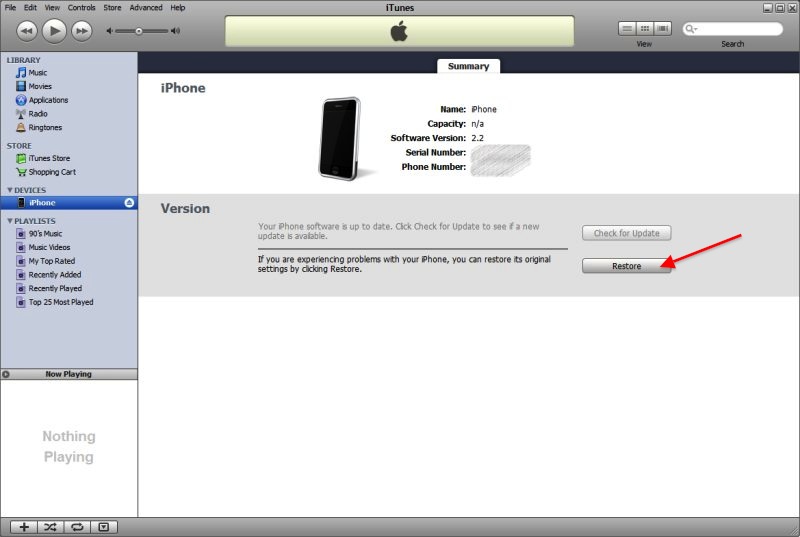
To perform a factory reset and install a fresh copy of iOS4, you will need to perform the following steps:
- Open iTunes and connect your iPhone 3G.
- Once it has performed a sync, make sure to backup your iPhone by right clicking on the iPhone menu item on the navigation bar and selecting “Back Up”. It won’t hurt to select “Transfer Purchases” either, this will copy all your iPhone apps into iTunes if they weren’t there already.
- Once you have backed up your iPhone, click the Restore button and iTunes will take care of the rest.
Conclusion
Performing the above steps might result in little or no improvements to the speed and responsiveness of your iPhone 3G, each user has a different handset setup, for example; some people jailbreak and enable additional features for their iPhone’s.
That said, some users have reported a steady increase in speed and the suggestions above have helped make their handsets a little more usable. We would love to know if these tips help bring your device back to a more usable state, let us know in the comments.
Get the TNW newsletter
Get the most important tech news in your inbox each week.
Also tagged with


