
Over the last month or so I’ve had a pretty effective system in place that has proven to work brilliantly at ensuring my inbox remains clear all day.
The system is called The Zee Inbox Clearing and Mitigation Method – kidding. This system has no name but it is straight forward and deceptively simple – this isn’t a long post. However, it does require you be using Gmail and also requires a plugin called Boomerang, currently only available for Gmail.
Boomerang is a browser plugin available for Chrome, Safari and Firefox which does two things: lets you send emails at a later time, secondly and perhaps more uniquely, hides emails from your inbox and only returns them at a set future time – hence the “boomerang” imagery. I should note, Boomerang isn’t free and nor is it cheap, but it’s free to try and I can tell you now, it’s proven itself to be priceless.
This is how the system works:
1. Wake up, read emails, reply to all you can reply to – long and short. There will be emails that you won’t be able to reply to because you need to get a certain task completed before you can. In that case, add the task to your to do list and ‘boomerang’ the email to appear back in your inbox on a date/time that you think you should have that task completed by.
The important thing to remember here is that there is only one reason you should ‘boomerang’ an email in the morning: when you are physically incapable of replying because you need more information to respond to the email. This ‘information’ might be in the form of details from someone else who you know should be getting back in touch over the next few hours or days. Or it might be because you have to put in a few hours of work or research to get the information prepared in order to reply to the email.
2. Now, inbox should be empty. How do you keep it empty?
Simply put. Any emails that arrive during the day that are likely to take more than 30 seconds to reply to, ‘boomerang’ to the next morning.
It’s as simple as that.
You need to be super strict about it too, don’t fall into the trick of “oh, this will just take a few more minutes…” NO. Hit that Boomerang button and deal with it tomorrow morning when you’re fresh and driven to get to inbox zero.
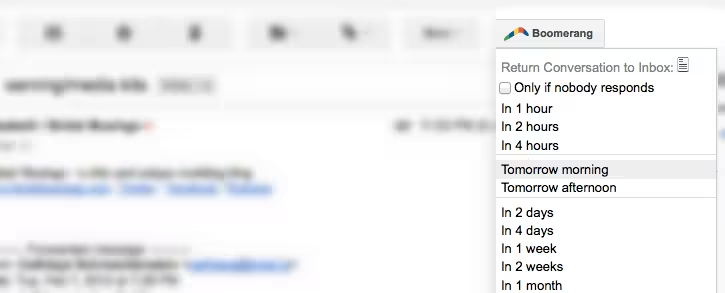
Pro Tip:
Boomerang doesn’t just let you ‘boomerang’ emails you’ve received, it also lets you do the same for emails you’ve sent. So give off that professional, efficient vibe by boomeranging sent emails that you want to follow up on at a later date.
Update:
Another great tool we learned about after publishing this piece is FollowUp.cc, similar functionality but designed specifically for this purpose.
Get the TNW newsletter
Get the most important tech news in your inbox each week.


