
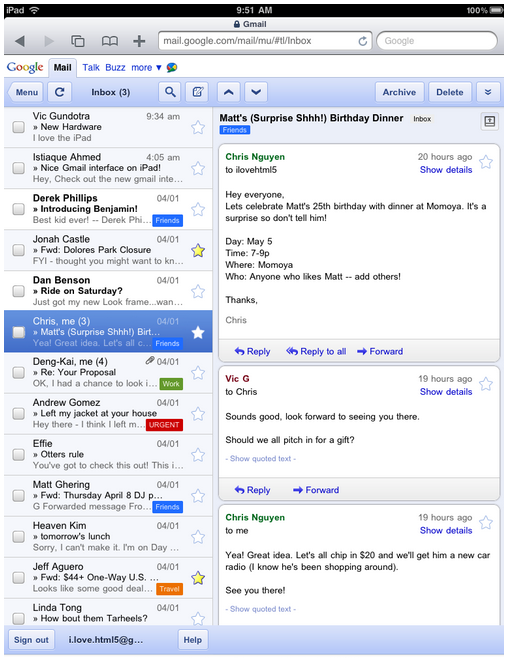
In case you missed it, Gmail released a great new web application for use on the iPad. It’s so pretty, we know that you want to play with it now before you get your iPad.
If you are running Firefox, the process is actually pretty simple. First, download the User Agent Switcher and install it. Now, head to tools, then to ‘default user agent,’ and finally ‘edit user agent.’ This is what you will change so that Firefox thinks that you are actually running an iPad.
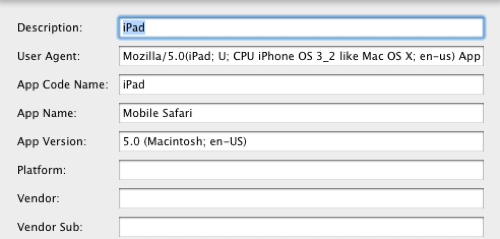
Now you need to do some text input, to change the first five fields. For ‘Description’, just enter ‘iPad’. For the second field, ‘User Agent’ enter:
Mozilla/5.0(iPad; U; CPU iPhone OS 3_2 like Mac OS X; en-us) AppleWebKit/531.21.10 (KHTML, like Gecko) Version/4.0.4 Mobile/7B314 Safari/531.21.10
For the third field, ‘App Code Name,’ enter ‘iPad.’ Fourth up, enter ‘Mobile Safari’ for ‘App Name.’ Finally, for the fifth slot ‘App Version’ add in ’5.0 (Macintosh; en-US).’ Now, head over to Tools, then Default User Agent, and set it to iPad. If you got lost at any point, this handy image should set you straight:
Now load up Gmail.com and it should be set to the wonderful new touch Gmail interface! It will be less fun to use if you do not have a touch-enabled screen, but it just might tide you over until the big day, right?


Cool! Nice Hack!
Any luck for Safari users??
oh damn! GMail for iPad looks totally awesome! But to be honest – GMail is one of the best designed webapp in every device: pc/mac, iphone, ipad… usability of GMail is truly amazing! Good work, Google!
Win a 16GB wifi/3G iPad http://bit.ly/9S2Pts @TradingCradles
Great idea. One problem is I can't seem to scroll in the window. No mouse, no grabbing, no arrowing. bummer. Also the highlight color (in the message list) seems off, where I can't read the text when first highlighting an unread message. I'm sure the real iPad does not work this poorly, but I do love the idea for this!
I want this hack for Chrome.
not really functional, highlight color difficult to read, no scroll, very slow
Not working here on FF 3.6 on Windows. I get a small, scrolling box in the upper-left corner, and it's all basic text/html.
Create a shortcut with the following:
C:UsersPatrickAppDataLocalGoogleChromeApplicationchrome.exe –user-agent=”Mozilla/5.0(iPad; U; CPU iPhone OS 3_2 like Mac OS X; en-us) AppleWebKit/531.21.10 (KHTML, like Gecko) Version/4.0.4 Mobile/7B314 Safari/531.21.10″
Chrome will startup identifying itself as an iPad.
I have tested it, and gmail will show as the iPad interface. But I can not scroll…
Anyone got it to scroll?
scroll do work. check this out, its very easy to understand because it was all made with pictures. I made it only for mac :)
http://samjitek.blogspot.com/2010/04/mac-os-x-n…
Wow, I quite liked the interface! Makes me want to start poking the screen to move my MacBook, or, also, it seeks to buy. Damn. Should not be tried out, CUE Fund YIT.
GMail is one of the best designed webapp in every device: iphone, ipad… usability of GMail is truly amazing!
I have tested it, and gmail will show as the iPad interface. But I can not scroll. I can’t seem to scroll in the window. No mouse, no grabbing, no arrowing. bummer.
I’m sure the real iPad does not work this poorly, but I do love the idea for this!
I too would love to see a version of this for Android as well. You can also check out this interface from a desktop PC, via Safari.
Install Safari, then hit Edit / Preferences and click the Advanced tab. Click to show the “Develop” menu. Click OK.
Now in the main Safari screen, hit ALT (to bring up the menu, it’s hidden by default) and click Develop, under the User Agent menu, select Mobile Safari for iPad, iPhone, or iPod Touch.