
MOUNTAIN VIEW, CA – JANUARY 21: (FILE PHOTO) A sign is posted outside of the Google headquarters January 21, 2010 in Mountain View, California. Google will report fouth quarter earnings today. Google announced on March 22, 2010 that it would be moving its Chinese search engine to Hong Kong from the mainland in an attempt […]
 Credit: Justin Sullivan
Over the past five years, rumours have circulated that search behemoth Google has been working to roll out a new Cloud storage service called Google Drive, allowing users to store their documents, media and data online, similar to popular Cloud platform Dropbox.
Reports that the service is to launch soon have been given a huge boost after Brazilian technology website Gemind managed to unlock hidden references to the service in Google Docs, detailing steps to enable a “Download Google Drive” option within the website itself.
The option looks to only be available to users with the correct privileges, maybe Google employees, but it may allow Google users to download an application to sync their entire Google Docs archive to their new Google Drive account or vice versa – when it launches.
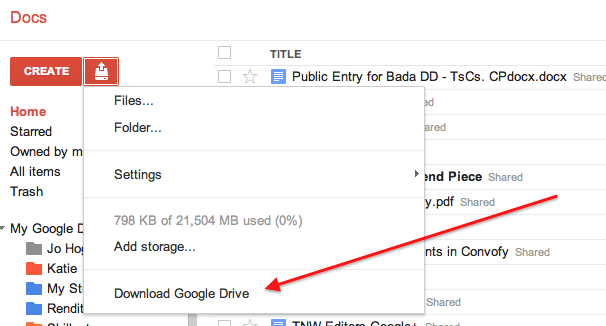
When clicked, the ‘Download Google Drive’ option doesn’t instigate any website actions, instead taking you back to the main document list.
To enable the option on your own account, you need to follow the instructions below (tested in Chrome at the time of writing):
- Open Google Docs and then open Developer Tools in the Chrome browser (View -> Developer).
- Click the ‘Scripts’ option on the top bar of the Developer Tools and ensure the current file is ‘program’. From here, search for config [‘cookieFetchElement’] (typically line number 365) and then click the line number in the sidebar to effectively ‘lock’ that code instance and turn it into a breakpoint (it should show a blue highlight).
- Now refresh the page.
- You should now see that the code remains the same but the website has locked at the point you specified.
- Hit the ‘Console’ option on the Developer Tools top bar and then copy and paste the following code:config.ed = true; config.ddu = ‘.’;
- Head back to the ‘Scripts’ window and then press the play button on the right hand side. The code should load and you should be able to click on the upload option next to ‘Create’ button.

You should now have the option enabled; you can’t do anything with it but it could make you feel warm and fuzzy inside knowing that it is already in Google’s code, ready to be launched.
Techcrunch recently posted that Google Drive test pages had started to appear in Google’s search results, further reinforcing rumours the service could be launching imminently, leaving it purely in the hands of the search giant to announce when its long-rumoured, now almost official Cloud storage service will launch.
Find all the latest Google news every day at TNW Google.
Get the TNW newsletter
Get the most important tech news in your inbox each week.
Also tagged with


