
SYDNEY, NSW – AUGUST 17: A man listens to an iPod MP3 player through earphones August 17, 2005 in Sydney, Australia. Research conducted by the National Acoustic Laboratories, to be released by the Australian Federal Government today, has found that up to a 25% of people who use iPods or other portable music devices will […]
 Credit: Ian Waldie
Audible, the audiobook service owned by Amazon, today updated its iOS app with a much-needed redesign and a handful of new features designed to improve the discovery and playback experience.
As you can see below, the old theme (left) has been switched out for a white, slightly flatter design (right) that’s more in-line with iOS 7. It’s a refreshing change complimented by a new ‘Discover’ section that offers a vertical stream of audiobook recommendations. Just like the Kindle for iOS app, it’s not possible to buy Audible content directly through this app. You can, however, review samples and save audiobooks to your Wish List for purchasing online.
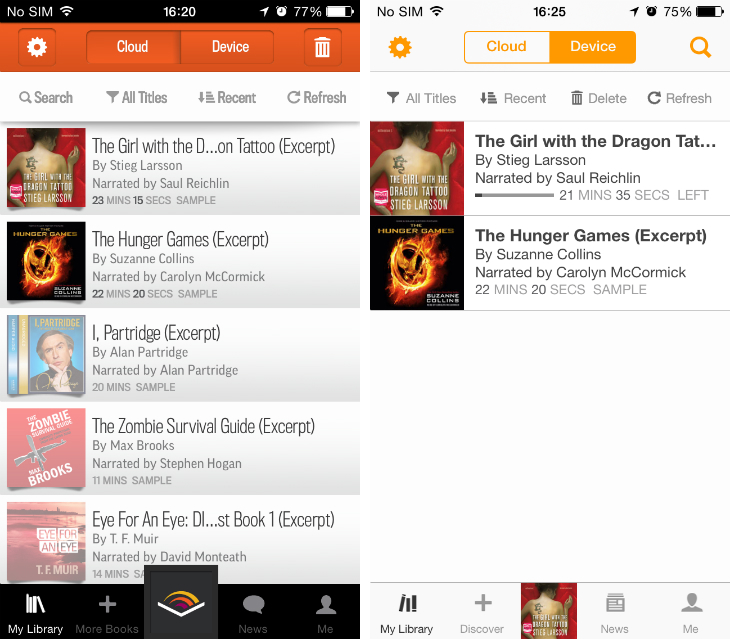
Elsewhere, Audible has added a 30-second forward button to the in-app player, making it easy to skip ahead, as well as a revamped search tool that also incorporates results from the aforementioned Discover section.
Thumbnail image credit: Ian Waldie/Getty Images
Get the TNW newsletter
Get the most important tech news in your inbox each week.
Also tagged with


