
TNW Quick Hit

Boomerang for Gmail lets you control when you send and receive emails.
Love It: Scheduled sends. Get email when you need it. No more cluttered inbox.
Hate It: It’s 3rd party, so you can’t get it via the Chrome Extensions gallery or Firefox Addons site.
Overall: 5/5
The Details
When I woke up this morning, I had 41 emails over 5 hours. Needless to say, I get a lot of email. While quite a bit of it is easily enough dealt with and dismissed, I have a fair amount that I don’t need until days after the fact or simply can’t handle at that time.
What I need is a better option than an overstuffed inbox and cluttered folders where I’ll forget what’s in there. Boomerang can do just that:
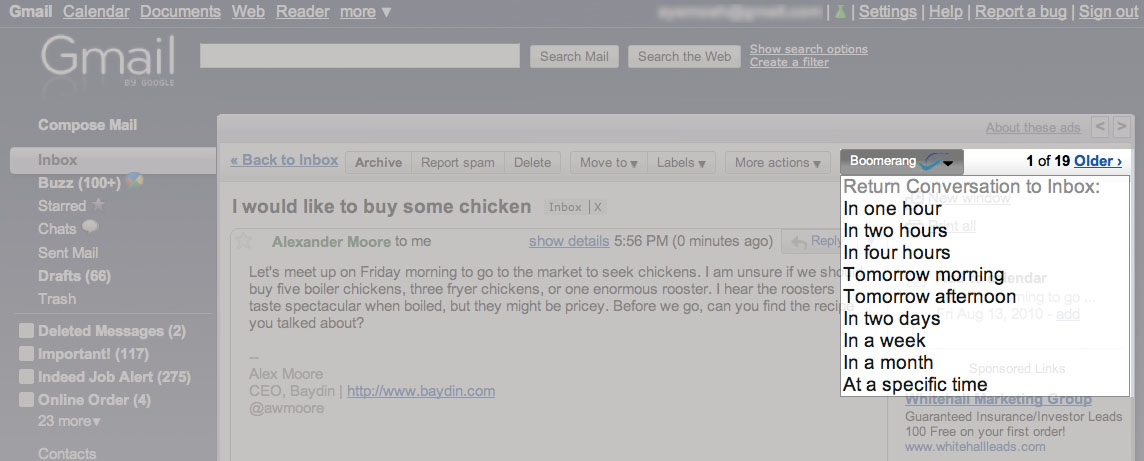
Boomerang is a plugin that fits beautifully into the default Gmail UI. Let’s say that you get a message, but don’t need to have it handy until later. All you have to do is select the Boomerang tool and tell Boomerang when you need to see the message again.
As you can see, there are a few default options for Boomerang, but you can also enter a specific time and date. For me, this is the real selling point. When dealing with application reviews that are under an embargo for a set amount of time, it’s really easy to lose track of what needs to happen and when.
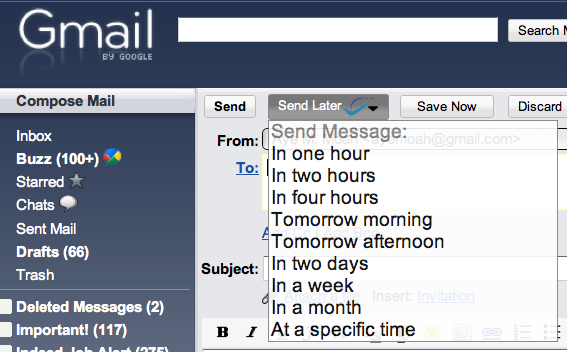
Another great use for Boomerang is scheduled sending of email. How often have you sent a message at some strange hour, only to be concerned that it will get lost in the shuffle? If you know that someone will need to see your message for an 11 am meeting, you can schedule your message to be sent a few minutes before, no matter their time zone.
Whether for personal use or business, Boomerang is simply a great idea. Here are some instances where Boomerang might just make your day:
- Paying bills on time
- Scheduled email in other time zones
- Send a birthday message while it’s on your mind
- Reminding yourself to follow-up with a client
The real kicker? You don’t even have to be online in order to schedule your emails. Since everything is handled server-side, you can set your schedules and then synchronize when you’re back on an Internet connection. Boomerang will take care of the rest.
If you’re worried about security, Boomerang is very open about the information that it accesses. According to Alex Moore, the CEO of Baydin:
Like most other Gmail plugins, we need access to the full email data to be able to move and send messages. In our queries, we only store the headers of the message (subject, sender, time) so that we can uniquely ID the message you want to schedule. We don’t store any message text.
While Boomerang is a plugin, it’s only available through invitation for now. It will work in Gmail for those of you running Google Chrome or Firefox 3.6 and higher. Luckily Baydin, the company behind Boomerang, has given TNW readers a code that will be valid for the first 250 people who use it at the Boomerang for Gmail site:
b4gbeta
Well, make that 249…
Get the TNW newsletter
Get the most important tech news in your inbox each week.
Also tagged with


