
Read It Later, the tool that lets you save articles fast to read later has released a brand new feature that’s likely to warrant your attention.
The feature, called Digest, analyses your articles and automatically groups them into topics, arranged in an elegant magazine style format for you to read.
Unlike tools like delicious which require you to tag and organise your bookmarks. RIL’s Digest is able to automatically detect what an article is about and organises it accordingly.
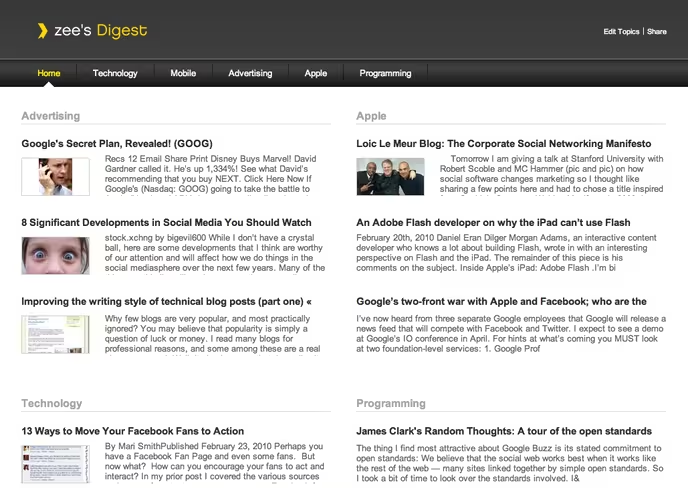
“There is a fundamental problem with displaying your items in a list. It’s hard to know where to start. Do you start from the top? From the bottom? Randomly? None of these make a whole lot of sense because the order in which you saved things is not necessarily the order you want to read them.” says developer and founder Nate Weiner.
Although the service works very well as is, you do have full control over customizing Digest. You can add topics, remove them, rearrange them and even defining your own custom topics that articles will be sorted into.
Awesomely, if you’ve saved a number of videos to Read It Later, it will create a separate section just for those (as seen below).

You can also make your Read it Later Digest public, you can see mine here, so a link from your blog to your “what I’m reading” is a must. Web celebs like Scoble, are likely to begin sharing theirs in no time.
Weiner has also personally informed me that Digest is “a very good taste of what to expect from RIL on the iPad.”
You can grab your Digest in beta from tomorrow, but the service will officially launch in a few weeks as a paid offering. Weiner also reassures us that RIL as it is now will always remain free.
Have a watch of the video demo if you’re interested in learning more before getting your RIL profile set up:


Reminds a lot of feedly.
Great tool,
But now this, can I integrate my Delicious or Digg,into it, so the tool can read all my articles within Delicious, so I can browse through them visually later? based on folders, and a visualisation. And based on importance, like the number of saves on Delicious, Reddit, Digg, Google Page Rank… so I can find that 1 article I told my collegue about, to mail it to him. Then I would have the tool I look for… then I can still read it everywhere, tag it when I want and have time. And save it with 1 click from my browsers everywhere…
Then, feedly does the reading of RSS already, if the idea of the bookmarking, the already tagged and bookmarked would be integrated, it would be uge!
Ofcourse, your local bookmarks could be integrated too, since I use google chrome, all devices are sinqed already, but the organising is not done yet.
Finally, somewhat offtopic, when will someone write an extension, so Chrome gives not 8 but 25 frames in the new tab area…. Then a tool like this could be integrated too, since you would click some bookmarks more often. (And the history is not saved, since I use click and clean each time I close Chrome).
Cheerz,
Great tool,
But now this, can I integrate my Delicious or Digg,into it, so the tool can read all my articles within Delicious, so I can browse through them visually later? based on folders, and a visualisation. And based on importance, like the number of saves on Delicious, Reddit, Digg, Google Page Rank… so I can find that 1 article I told my collegue about, to mail it to him. Then I would have the tool I look for… then I can still read it everywhere, tag it when I want and have time. And save it with 1 click from my browsers everywhere…
Then, feedly does the reading of RSS already, if the idea of the bookmarking, the already tagged and bookmarked would be integrated, it would be uge!
Ofcourse, your local bookmarks could be integrated too, since I use google chrome, all devices are sinqed already, but the organising is not done yet.
Finally, somewhat offtopic, when will someone write an extension, so Chrome gives not 8 but 25 frames in the new tab area…. Then a tool like this could be integrated too, since you would click some bookmarks more often. (And the history is not saved, since I use click and clean each time I close Chrome).
Cheerz,
Digest for GoogleReader Shared Items may come in handy… any chance of mashing that up?
I like function – read offline, very useful on metro.