
An airplane flies over the head of a llama used to keep the grass cut at Chicago’s O’Hare airport on August 13, 2013. The airport authority has hired a crew of 25 llamas, donkeys, goats and sheep to help it maintain its sprawling grounds in order to keep wildlife away from the tarmacs. AFP PHOTO […]
 Credit: AFP/Getty Images
AOL is today shutting down Winamp, its once hugely popular and influential media player. Before you shed a tear though, Spotify just shared a delightful project called Spotiamp which, as the name suggests, lets you stream its music using a fully functional, Winamp lookalike player.
It’s Windows-only, so Mac and Linux users will need to look elsewhere, and requires a Spotify Premium subscription to access. Just click here to download the installer and login with your account when the relevant window pops up.
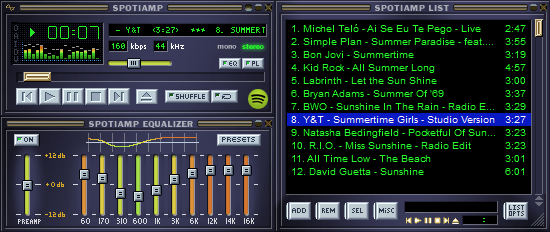
The official site for Spotiamp details some of the controls you’ll need to wrap your head around with the pseudo-Winamp player:
Click the Eject button in the main window to see your playlists. Double click on a track to play it. Click the O button or right click in the Window to bring up the Settings menu. You can paste a link to a Spotify playlist on the main window using Ctrl+V.
Kudos, Spotiamp. We couldn’t think of a better way to raise a glass and wish Winamp a fond farewell. To use its catchphrase just one last time, thank you Winamp. You really whipped the llama’s ass.
➤ Spotiamp (Via Spotify)
Image Credit: MIRA OBERMAN/AFP/Getty Images
Get the TNW newsletter
Get the most important tech news in your inbox each week.
Also tagged with


