For most Web users, generating a strong and secure password for each site they visit is a foreign notion.
The easiest route for generating and storing these passwords is through use of a password manager like Lastpass, Keepass or 1Password, but Qwertycards could offer a nice alternative to those that still don’t trust password managers with sensitive data.
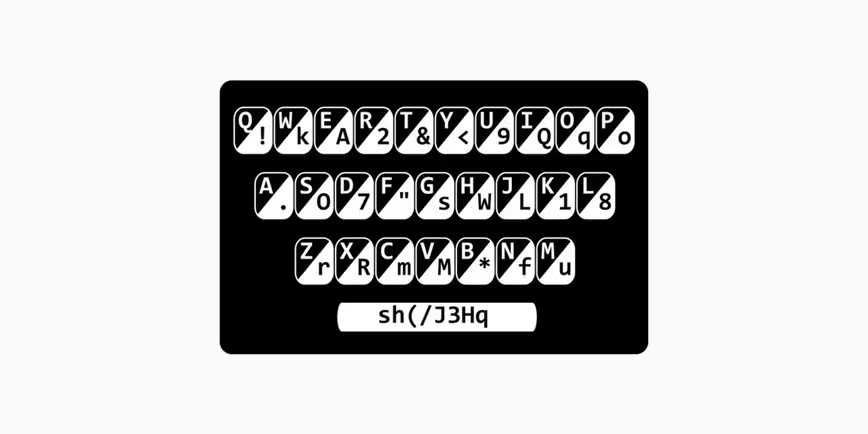
Qwertycards are wallet-sized cards that give you a unique cipher to use for creating strong passwords. Printed on each card is a QWERTY keyboard with substitutions for each key.
To generate a new password, users would use the base code at the bottom of the card, followed by a secret word of their choosing, but with the characters substituted for the cypher text on the card.
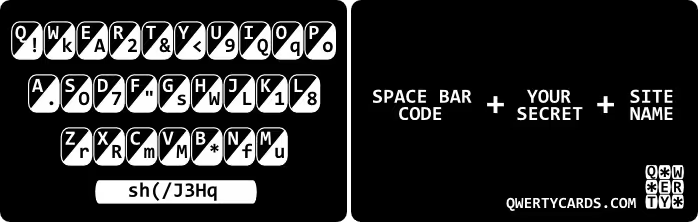
Using Qwerty cards is pretty simple:
Step 1: Type in the code letters shown on the ‘spacebar’ of the card
sh(/J3Hq
Step 2: Enter your own password or secret word
sh(/J3Hq******
Step 3: Type in the code characters for each letter of the website you are using. For example, with www.AMAZON.com use the code letters for AMAZON.
sh(/J3Hq******.u.rqf
It’s not a perfect option, but it’s a start. Qwerty cards are much better than your last name and the last two digits of your birth year, but again, a password manager is typically the more secure option, even when they get hacked.
No matter what you do, your password will probably never be as strong as this guy’s.
➤ Qwertycards Is A Wallet-Sized Card That Generate Secure Passwords [TechCrunch]
Get the TNW newsletter
Get the most important tech news in your inbox each week.


