The iPhone is the most popular camera on Flickr, and for good reason. Not only does it take very decent photos that keep improving with each iteration of the device, it makes it painless to share it with sites like Flickr and your various social networks.
That is, if you want to share them one-by-one. Even with the built-in Twitter integration in iOS 5, the option to tweet a photo disappears when you select more than a single photo. Similarly, the Facebook app for iOS makes it a pain to upload multiple photos to the service, forcing you to do it one photo at a time.
Enter Batch, a free and slick-looking iPhone app from the founders of Daily Booth that aims to do one thing: help you upload a bunch of photos to the Internet and share them with your friends. As it turns out, it does this quite well, but there are things we’d like to see improved. First, the good…
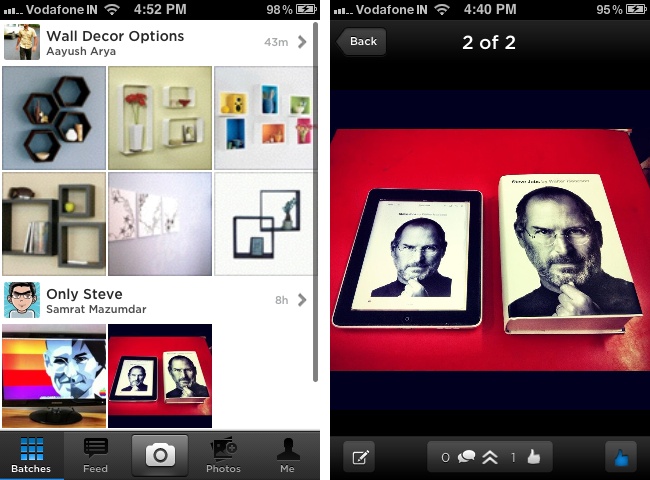
Batch is beautifully crafted, with the sort of attention paid to UI design that is the hallmark of many a great iPhone app. It has four tabs and a button in the tab bar and some of the screens are pretty loaded with options, but at no point do you feel overwhelmed by the app and confused about any of its features.
To use it, it’s mandatory that you sign in with your Facebook account. If you do not have one, well, go create one, because you are not getting past the launch screen without it. Once inside, you can browse through your friends’ batches or look at the feed to see new batches come in as they are uploaded (although both tabs look pretty much the same to us right now), create a batch using new photos from the camera or from your photo library and take a look at your profile.
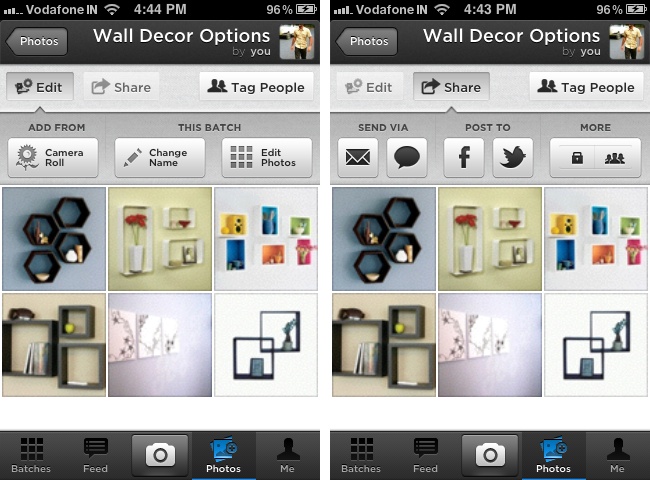
Creating a batch is pretty easy: you can either use the huge “Create a new batch” button under the Photos tab or tap on the Camera button to snap new photos that you can add to a new or existing batch. The app is very flexible in terms of adding, deleting and editing batches, and you can remove photos from or add them to batches at will.

When you create a batch, you are given the option to tag your friends in it and to automatically share it on your Facebook and Twitter profiles once it is uploaded. However, despite checking the latter two options, the link to my batch was not posted anywhere. I had to manually post it from the batch screen within the app and it then worked without a problem, but it’s a bug that needs to be fixed in the next version.
There are other more significant problems with the app too, like you cannot give a description to your batch along with a name and, even more importantly, cannot share to Flickr in this first version. And while I understand uploading the photos to Batch’s own service and posting a URL to Twitter, it would have made far more sense to create an album on Facebook rather than simply post a link on your wall. Also, the sharing via text message feature is broken in this version of the app.
But everything else works—you can look at your friends’ batches and like or comment on their photos and you can keep track of likes and comments your own photos receive. The app is also plenty fast and we did not experience any crashes while using it. Overall, it is very well-designed and a joy to use; we just fear that it’s too limited for its own good.
If you want sharing in batches, you may also want to consider paid options like Camera+ and Camera Plus Pro. Both of these similarly titled applications are actually much more complicated than Batch and are more about the photography than the sharing, however, so they may be overkill for you if you are just looking to share a bunch of photos with your friends on Facebook and Twitter from your iPhone.
Over time, we expect the developers of Batch to fill the holes in the app, both in terms of missing features and random bugs, and hopefully it will become much more useful as it gains more users. We’ll certainly be keeping our eyes trained on its progress.
[Batch is a free download from the App Store and is compatible with all iPhones running iOS 4.2 or later. It is not a universal app.]
[Header image courtesy of Petr Jilek / Shutterstock.com.]
Get the TNW newsletter
Get the most important tech news in your inbox each week.